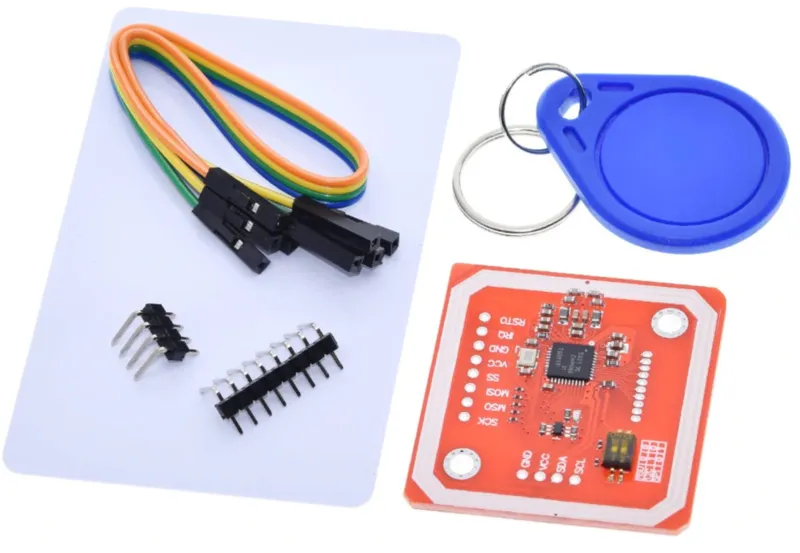
SKU: OT2053-D82 Numero articolo: NA144 EAN: 8499705714510

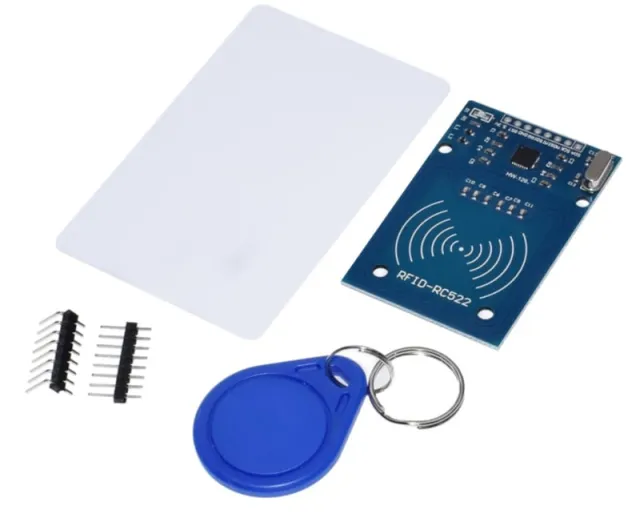
Questo modulo PN532 RFID può, oltre a trasmettere e ricevere tag Mifare, inviare anche dati tramite NFC.
Il modulo può essere controllato tramite SPI, I2C o UART.
Specifiche:
Termini di ricerca: rfid, rfid kit, rfid-kit, rfid set, nfc set, nfc kit
Dimensioni
Lunghezza: 4,3cm
Larghezza: 4cm
Altezza: 0,3cm
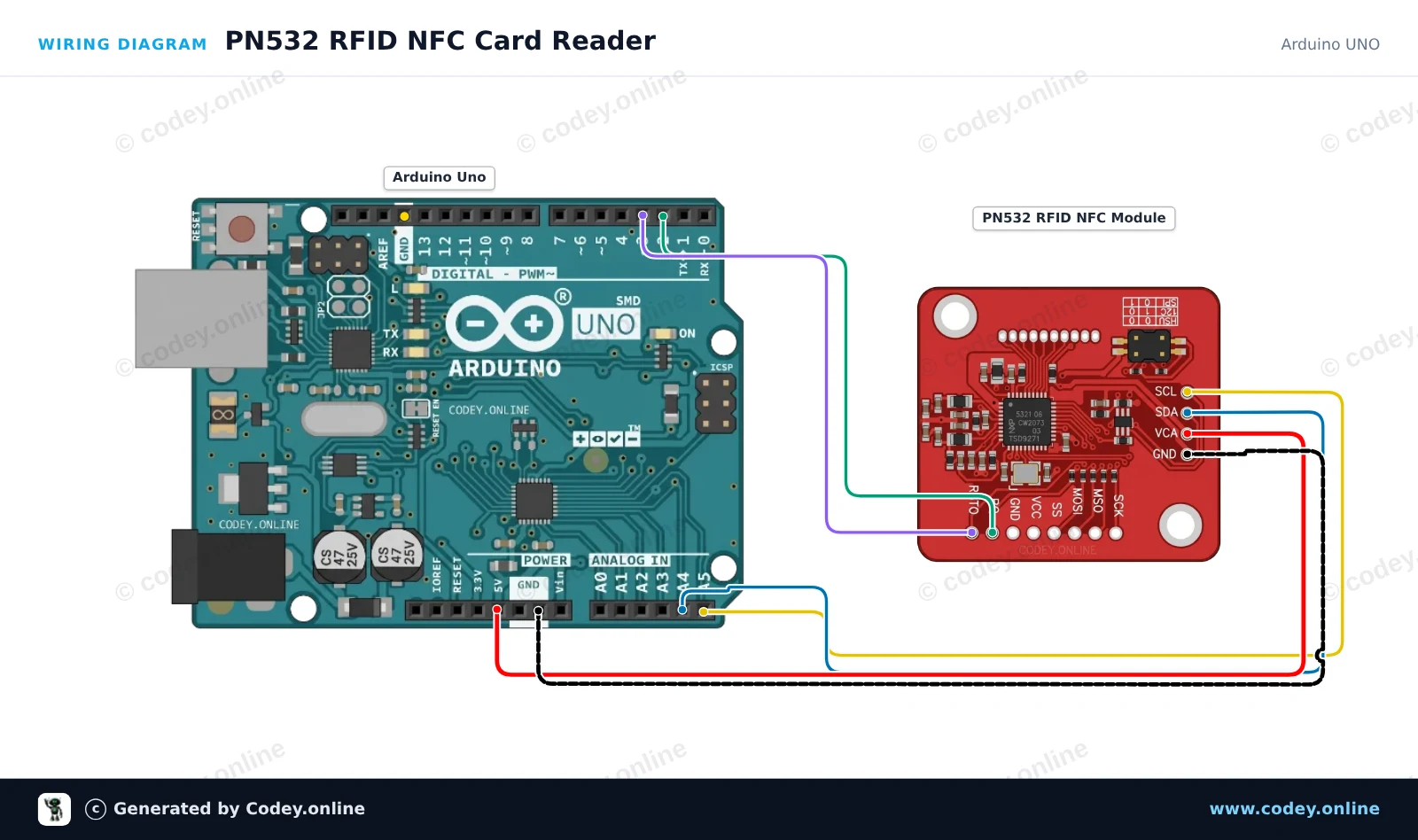
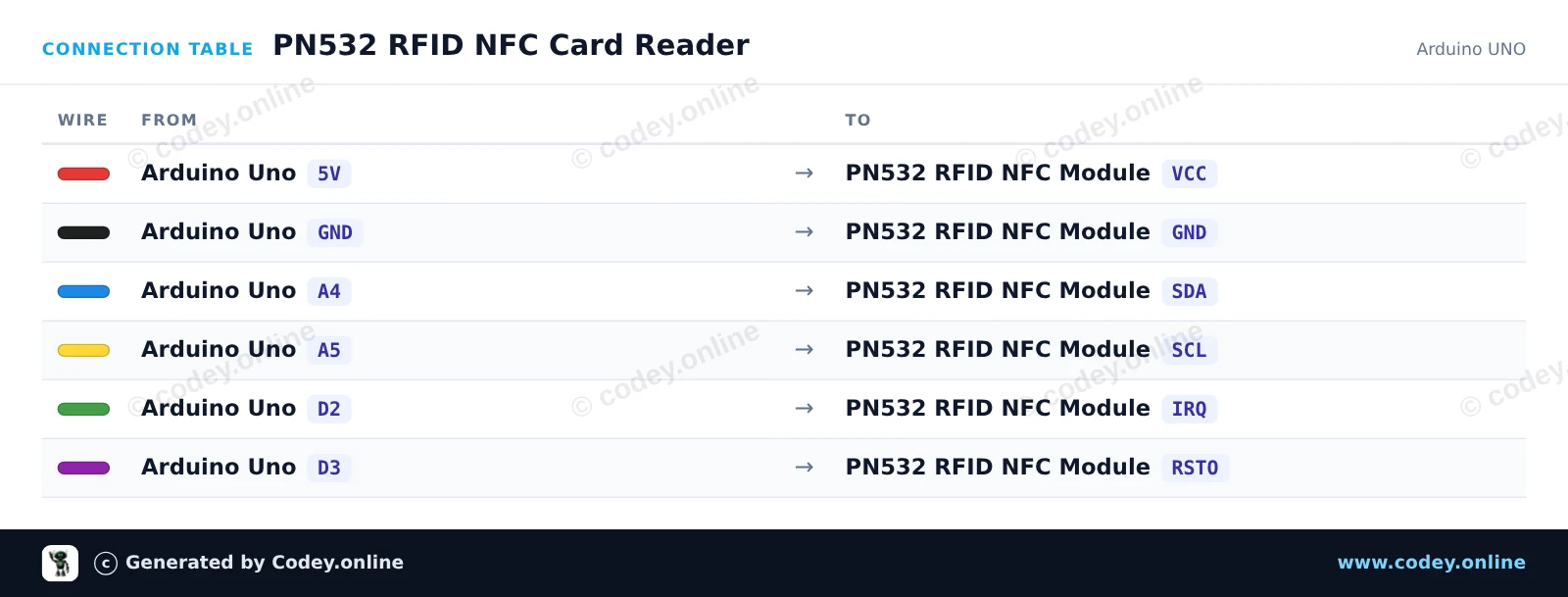
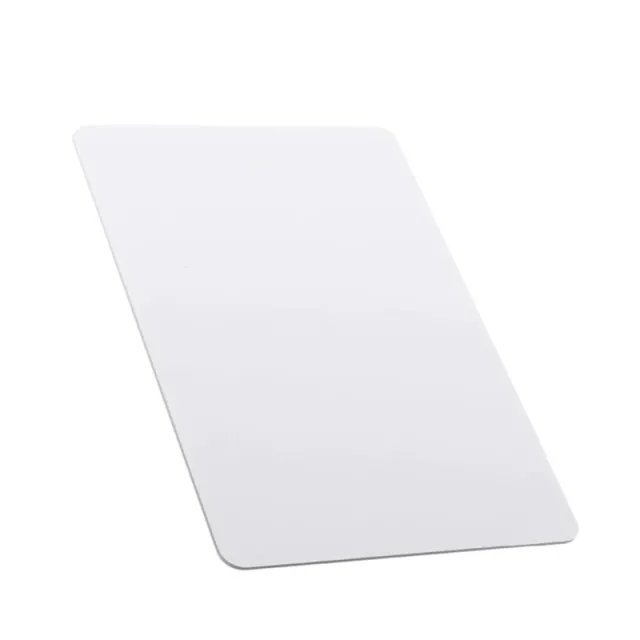
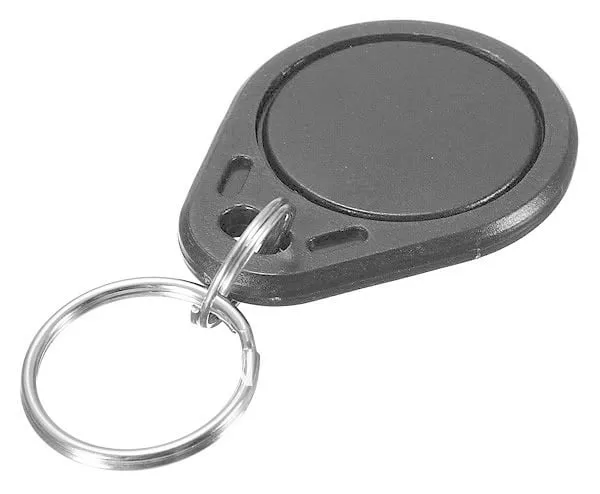
Ecco come collegare il Kit PN532 RFID NFC con scheda S50 e portachiavi S50 a un Arduino UNO o ESP32, con uno sketch di esempio che puoi caricare subito.
Questo esempio legge tag RFID/NFC (come le schede Mifare) utilizzando il modulo PN532 tramite I2C. Assicurati che i DIP switch sul modulo PN532 siano impostati sulla modalità I2C (di solito CH1=ON, CH2=OFF). Avvicina un tag NFC o RFID compatibile da 13.56MHz al modulo per stampare il suo UID univoco nel Serial Monitor.
/*
 * ==================================================================
 *  Generated by Codey.online  —  https://www.codey.online
 * ==================================================================
 *  Project   : PN532 RFID NFC Card Reader
 *  Board     : Arduino UNO (arduino:avr:uno)
 *  Parts     : PN532 RFID NFC Module
 *  Libraries : Adafruit PN532 1.3.4
 *
 *  Codey Online is an AI-powered browser IDE for Arduino and ESP32.
 *  Describe your project and Codey writes the code, draws the wiring
 *  diagram and uploads it to your board, straight from the browser.
 *  This code is free to use, modify and share, without warranty.
 * ==================================================================
 */

#include <Wire.h>
#include <Adafruit_PN532.h>

#define PN532_IRQ   2
#define PN532_RESET 3

Adafruit_PN532 nfc(PN532_IRQ, PN532_RESET);

void setup() {
  Serial.begin(115200);
  while (!Serial) delay(10);

  Serial.println(F("Initializing PN532 NFC Module..."));
  nfc.begin();

  uint32_t versiondata = nfc.getFirmwareVersion();
  if (!versiondata) {
    Serial.println(F("PN532 board not found. Check wiring and I2C mode switch."));
    while (1) delay(10);
  }

  Serial.print(F("Found PN532 chip! Firmware ver: "));
  Serial.print((versiondata >> 24) & 0xFF, HEX);
  Serial.print('.');
  Serial.println((versiondata >> 16) & 0xFF, HEX);

  nfc.SAMConfig();
  Serial.println(F("Waiting for an ISO14443A card or tag..."));
}

void loop() {
  uint8_t uid[7];
  uint8_t uidLength = 0;

  bool success = nfc.readPassiveTargetID(PN532_MIFARE_ISO14443A, uid, &uidLength, 500);
  if (success) {
    Serial.print(F("Found tag! UID: "));
    for (uint8_t i = 0; i < uidLength; i++) {
      if (uid[i] < 0x10) Serial.print('0');
      Serial.print(uid[i], HEX);
      if (i < uidLength - 1) Serial.print(':');
    }
    Serial.println();
    delay(1000);
  }
}Librerie necessarie: Adafruit PN532 1.3.4
Wiring diagram and example code generated by Codey.online — https://www.codey.online
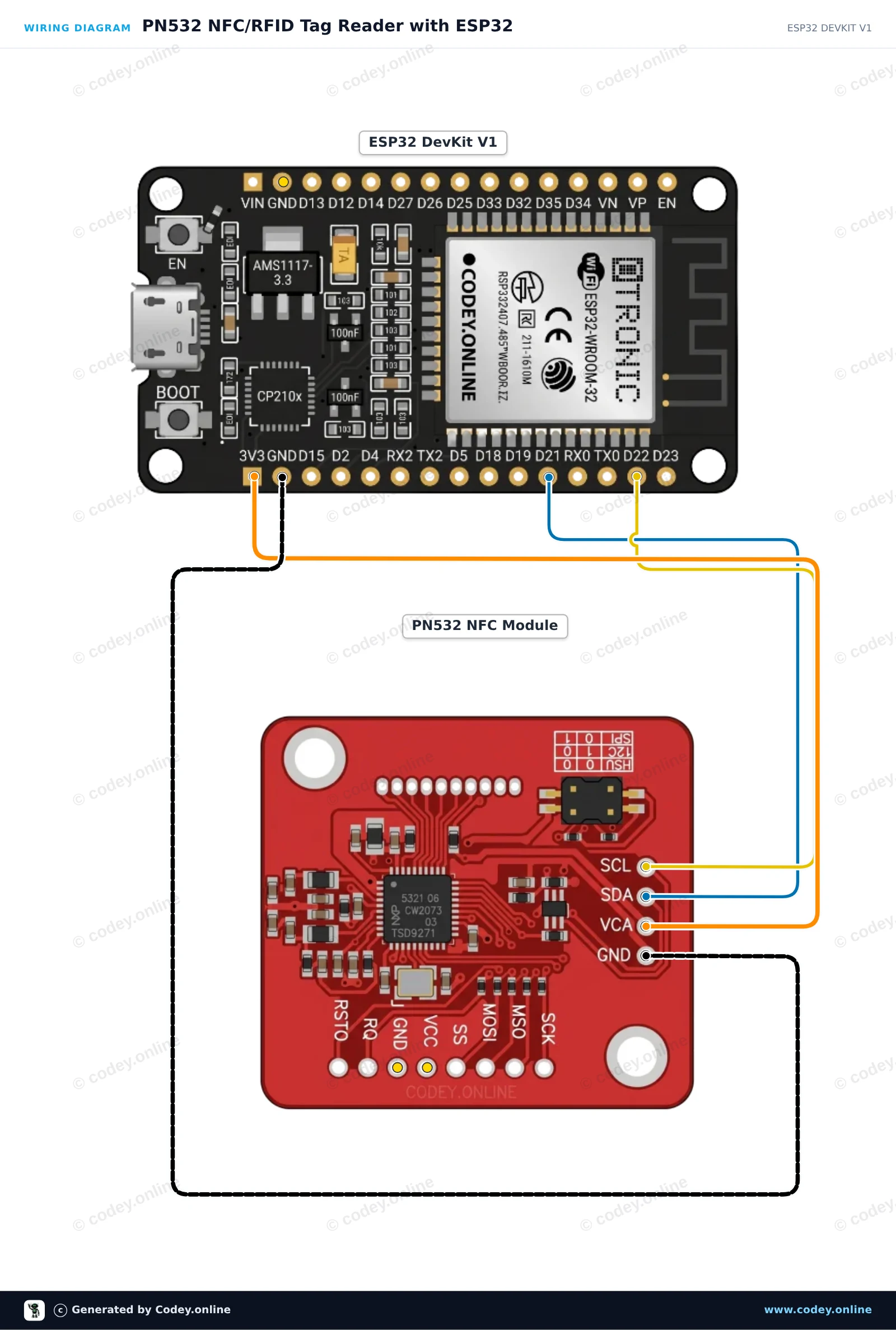
Questo circuito collega il modulo NFC/RFID PN532 all'ESP32 tramite I2C per leggere tag RFID o schede NFC standard da 13.56 MHz. Assicurati che gli switch DIP del modulo siano impostati in modalità I2C (Channel 0=HIGH, Channel 1=LOW). Quando una scheda o un portachiavi viene avvicinato all'antenna, l'ESP32 legge e stampa il suo identificativo univoco (UID) nel Serial Monitor.
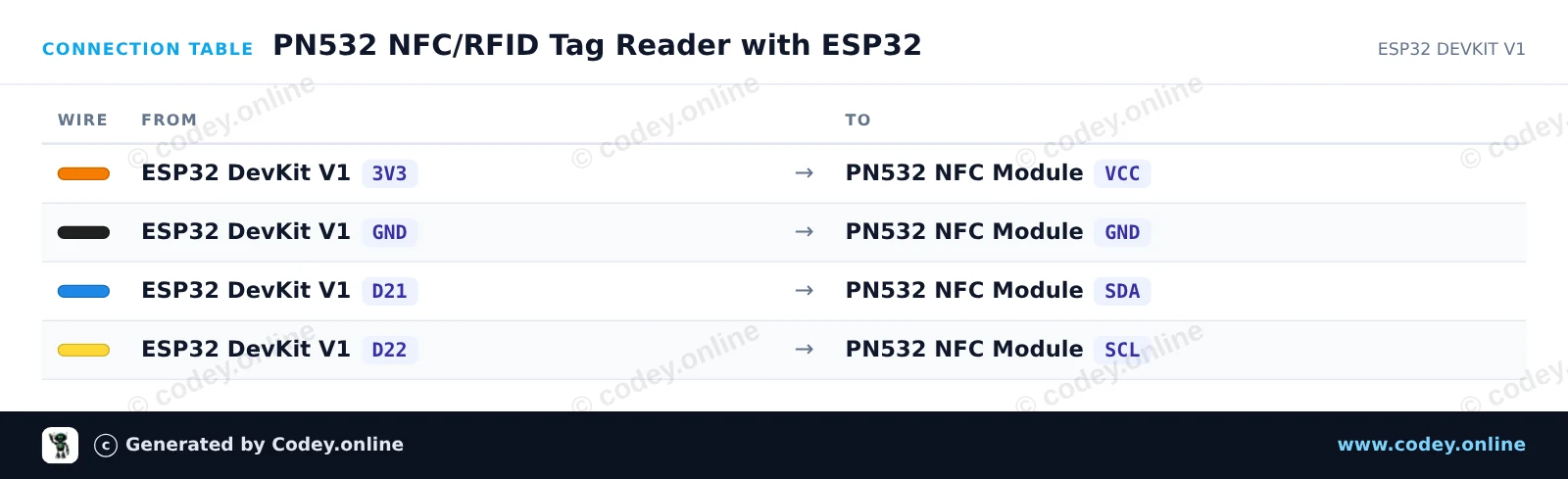
/*
 * ==================================================================
 *  Generated by Codey.online  —  https://www.codey.online
 * ==================================================================
 *  Project   : PN532 NFC/RFID Tag Reader with ESP32
 *  Board     : ESP32 DEVKIT V1 (esp32:esp32:esp32doit-devkit-v1)
 *  Parts     : PN532 RFID NFC Module
 *  Libraries : Adafruit PN532 1.3.4
 *
 *  Codey Online is an AI-powered browser IDE for Arduino and ESP32.
 *  Describe your project and Codey writes the code, draws the wiring
 *  diagram and uploads it to your board, straight from the browser.
 *  This code is free to use, modify and share, without warranty.
 * ==================================================================
 */

#include <Wire.h>
#include <Adafruit_PN532.h>

// Use I2C interface without dedicated IRQ/Reset pins
#define PN532_IRQ   (-1)
#define PN532_RESET (-1)

Adafruit_PN532 nfc(PN532_IRQ, PN532_RESET);

void setup() {
  Serial.begin(115200);
  while (!Serial) delay(10);

  Serial.println("Initializing PN532 NFC Reader...");
  nfc.begin();

  uint32_t versiondata = nfc.getFirmwareVersion();
  if (!versiondata) {
    Serial.println("PN532 not found! Check DIP switches (I2C mode) and wiring.");
    while (1) delay(100);
  }

  Serial.print("Found PN532 chip with firmware version: ");
  Serial.print((versiondata >> 16) & 0xFF, DEC);
  Serial.print('.');
  Serial.println((versiondata >> 8) & 0xFF, DEC);

  // Configure Secure Access Module (SAM)
  nfc.SAMConfig();

  Serial.println("Ready! Present an RFID card or NFC tag to the reader...");
}

void loop() {
  uint8_t success;
  uint8_t uid[] = { 0, 0, 0, 0, 0, 0, 0 };
  uint8_t uidLength;

  // Wait up to 500ms for an ISO14443A card
  success = nfc.readPassiveTargetID(PN532_MIFARE_ISO14443A, uid, &uidLength, 500);

  if (success) {
    Serial.println("Card detected!");
    Serial.print("UID Length: ");
    Serial.print(uidLength, DEC);
    Serial.println(" bytes");
    Serial.print("UID: ");
    nfc.PrintHex(uid, uidLength);
    Serial.println();

    delay(1000); // Debounce to avoid repeated rapid reads
  }
}Librerie necessarie: Adafruit PN532 1.3.4
Wiring diagram and example code generated by Codey.online — https://www.codey.online











 English
  Nederlands
  Frans
Frans  Deutsch
  Español
  Suomi
Suomi  Polski
  Dansk
Dansk  Ελληνικά
  Български
  Čeština
  Hrvatski
  Aileen