SKU: OT8822 Numero articolo: NA061 EAN: 8720828223482

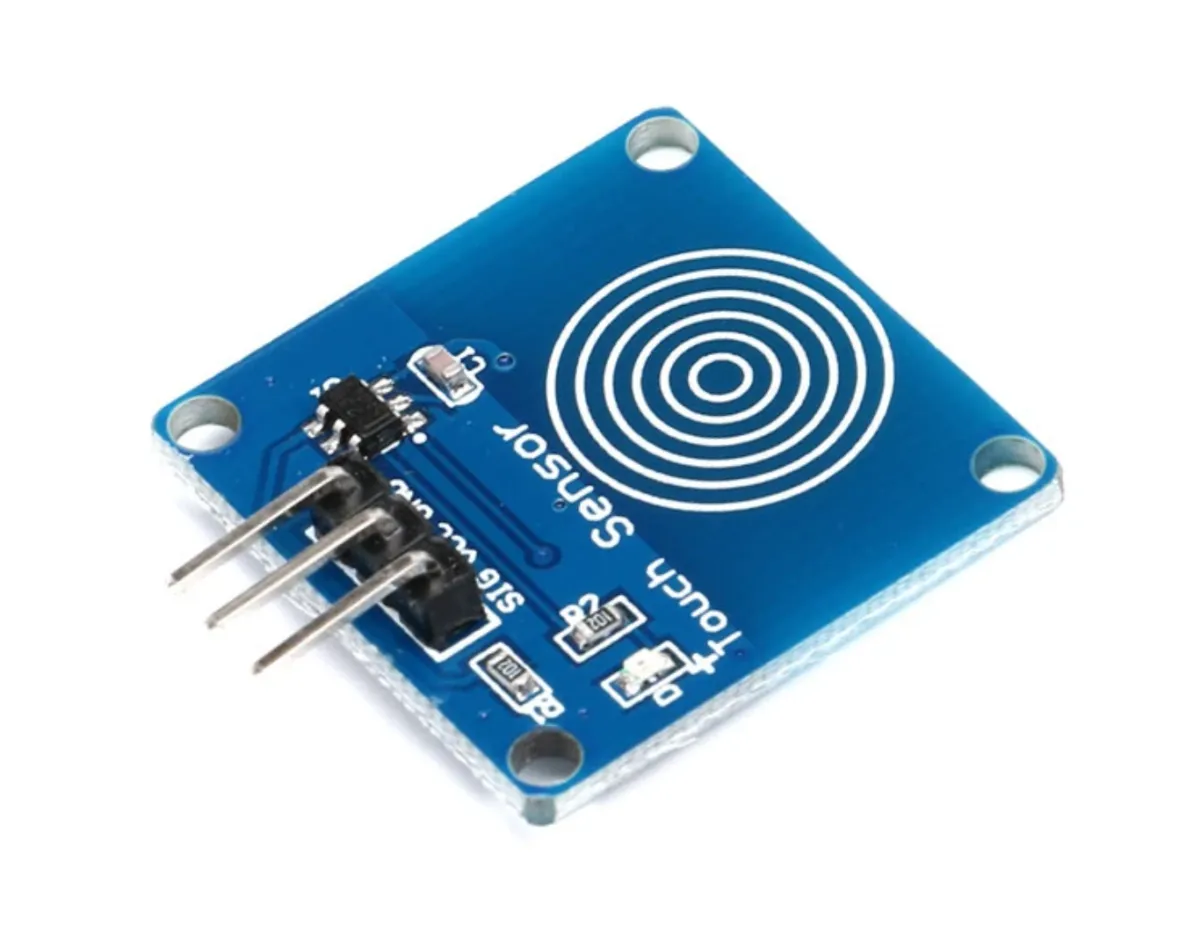
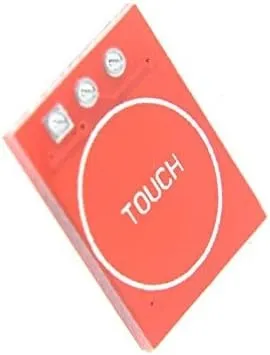
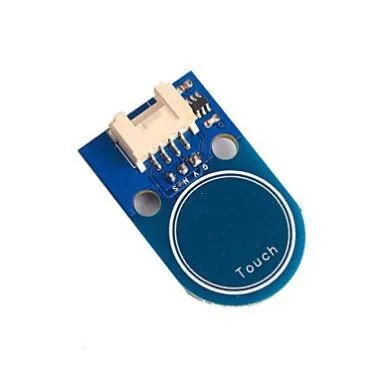
Il TTP223B è un sensore touch capacitivo che reagisce al contatto di un oggetto o di una persona su una superficie sensibile. Questo sensore è progettato per diverse applicazioni, come comandi touch, interruttori e pulsanti touch e altri dispositivi attivati dal tocco.
Specifiche tecniche del sensore touch TTP223B:
Il sensore touch TTP223B dispone di un circuito debounce integrato per prevenire disturbi. Il consumo energetico è basso, inferiore a 1 mA in modalità standby. Il sensore ha una risposta rapida inferiore a 60 ms e una lunga durata di oltre 100.000 cicli.
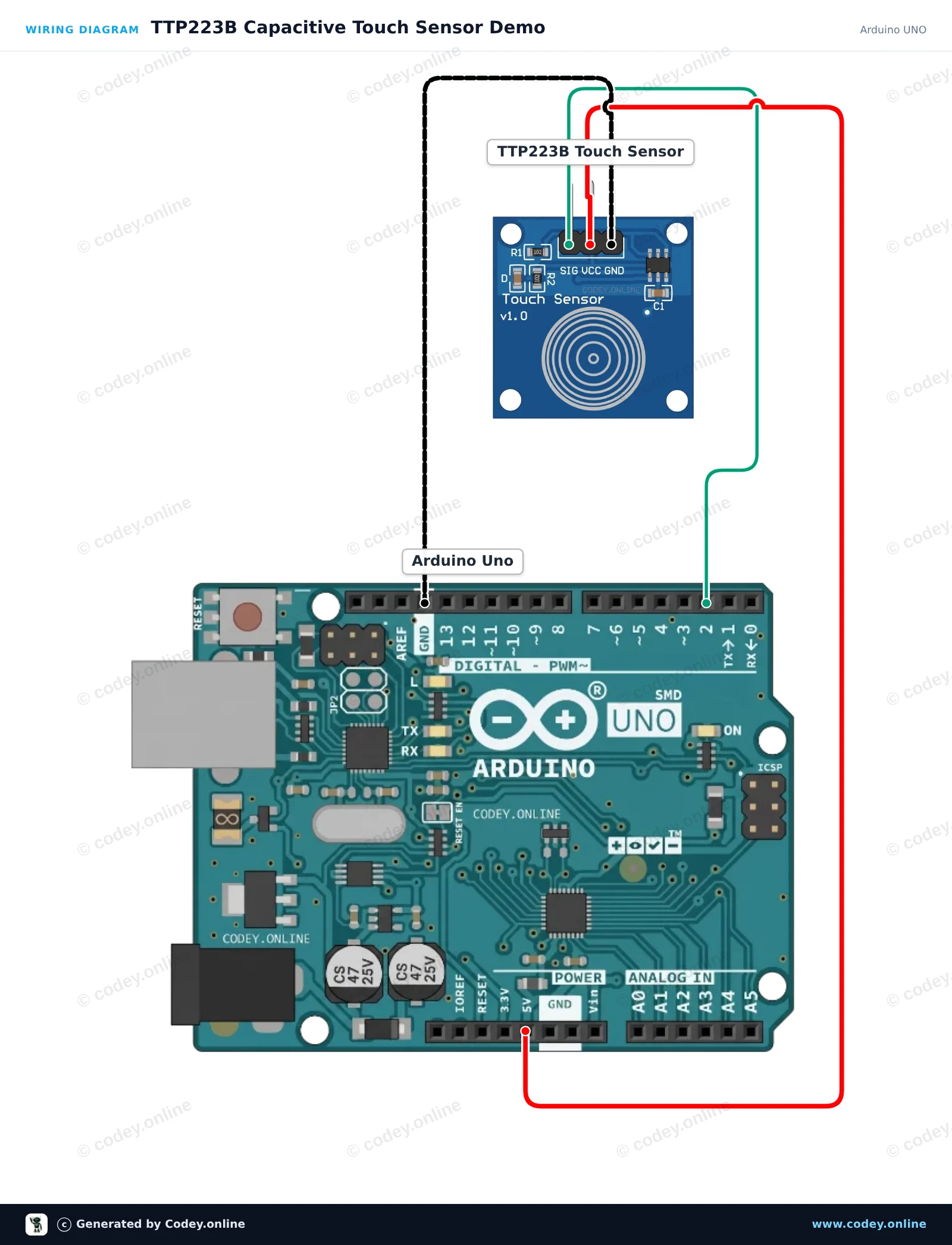
Ecco come collegare il Sensore touch TTP223B a un Arduino UNO o ESP32, con uno sketch di esempio che puoi caricare subito.
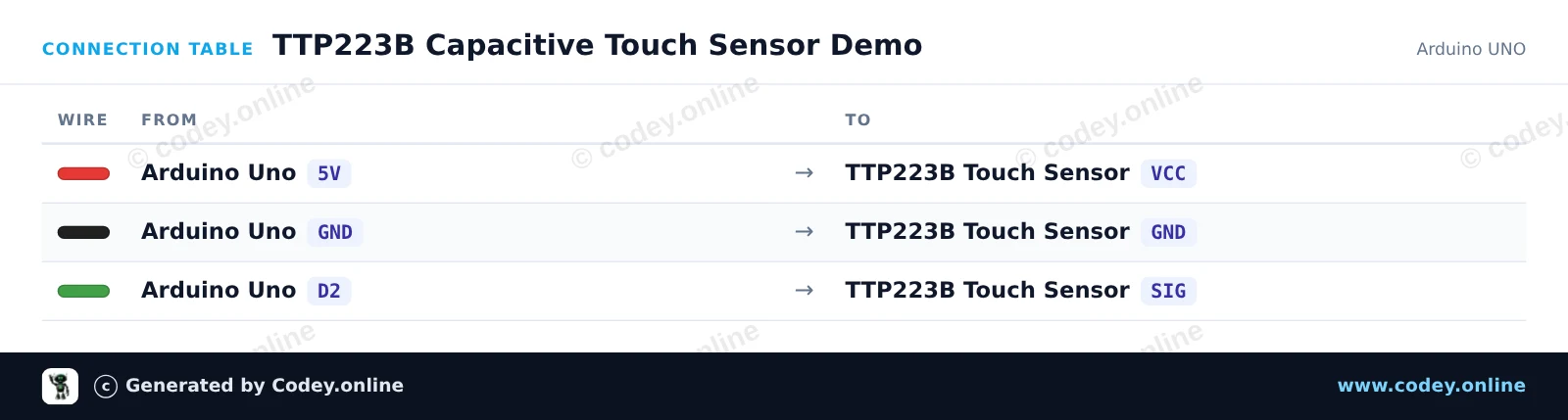
Questo progetto mostra il modulo sensore touch capacitivo TTP223B. Quando tocchi la piazzola di rilevamento capacitiva, il sensore emette un segnale HIGH che accende il LED integrato dell'Arduino e stampa lo stato nel Serial Monitor.
/*
 * ==================================================================
 *  Generated by Codey.online  —  https://www.codey.online
 * ==================================================================
 *  Project   : TTP223B Capacitive Touch Sensor Demo
 *  Board     : Arduino UNO (arduino:avr:uno)
 *  Parts     : Touch sensor TTP223B
 *  Libraries : none (built-in)
 *
 *  Codey Online is an AI-powered browser IDE for Arduino and ESP32.
 *  Describe your project and Codey writes the code, draws the wiring
 *  diagram and uploads it to your board, straight from the browser.
 *  This code is free to use, modify and share, without warranty.
 * ==================================================================
 */

// Pin definitions
const int touchPin = 2;
const int ledPin = 13;

int lastState = LOW;

void setup() {
  pinMode(touchPin, INPUT);
  pinMode(ledPin, OUTPUT);

  Serial.begin(115200);
  Serial.println(F("TTP223B Touch Sensor Initialized"));
}

void loop() {
  int touchState = digitalRead(touchPin);

  // Control onboard LED based on touch input
  digitalWrite(ledPin, touchState);

  // Print message on state change
  if (touchState != lastState) {
    if (touchState == HIGH) {
      Serial.println(F("Touch detected!"));
    } else {
      Serial.println(F("Touch released."));
    }
    lastState = touchState;
  }

  delay(20);
}Wiring diagram and example code generated by Codey.online — https://www.codey.online
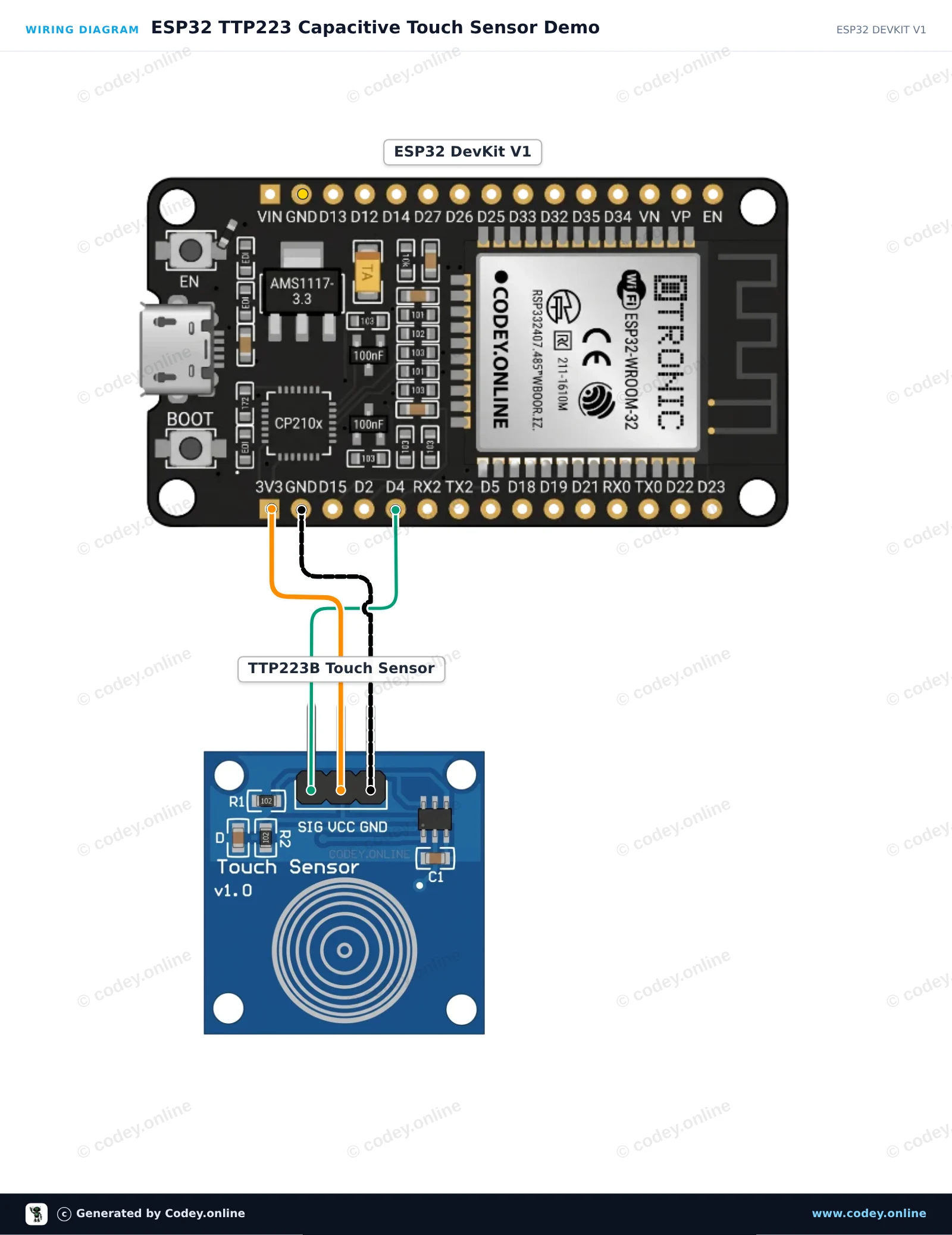
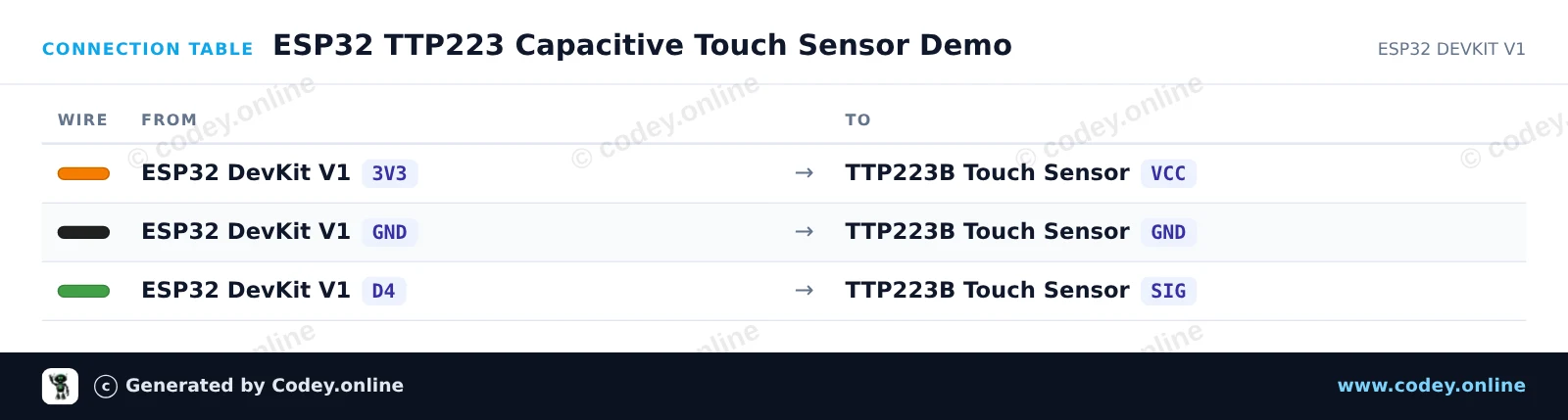
Questo circuito legge i segnali digitali dal sensore tattile capacitivo TTP223 e riflette lo stato sul LED integrato dell’ESP32. Quando tocchi la piastra del sensore, il pin del segnale va HIGH, accendendo il LED onboard e stampando gli eventi di tocco nel Serial Monitor. Il modulo è alimentato direttamente con 3.3V per una compatibilità logica sicura.
/*
 * ==================================================================
 *  Generated by Codey.online  —  https://www.codey.online
 * ==================================================================
 *  Project   : ESP32 TTP223 Capacitive Touch Sensor Demo
 *  Board     : ESP32 DEVKIT V1 (esp32:esp32:esp32doit-devkit-v1)
 *  Parts     : Touch sensor TTP223B
 *  Libraries : none (built-in)
 *
 *  Codey Online is an AI-powered browser IDE for Arduino and ESP32.
 *  Describe your project and Codey writes the code, draws the wiring
 *  diagram and uploads it to your board, straight from the browser.
 *  This code is free to use, modify and share, without warranty.
 * ==================================================================
 */

const int TOUCH_PIN = 4;   // D4 on ESP32 DevKit V1
const int LED_PIN   = 2;   // Onboard LED on ESP32 DevKit V1

int lastState = LOW;

void setup() {
  Serial.begin(115200);
  pinMode(TOUCH_PIN, INPUT);
  pinMode(LED_PIN, OUTPUT);
  digitalWrite(LED_PIN, LOW);
  Serial.println("TTP223 Touch Sensor Initialized.");
}

void loop() {
  int touchState = digitalRead(TOUCH_PIN);

  if (touchState != lastState) {
    if (touchState == HIGH) {
      digitalWrite(LED_PIN, HIGH);
      Serial.println("Touch detected!");
    } else {
      digitalWrite(LED_PIN, LOW);
      Serial.println("Touch released.");
    }
    lastState = touchState;
    delay(50); // Simple debounce delay
  }
}Wiring diagram and example code generated by Codey.online — https://www.codey.online





 English
  Nederlands
  Frans
Frans  Deutsch
  Español
  Suomi
Suomi  Polski
  Dansk
Dansk  Ελληνικά
  Български
  Čeština
  Hrvatski
  Aileen