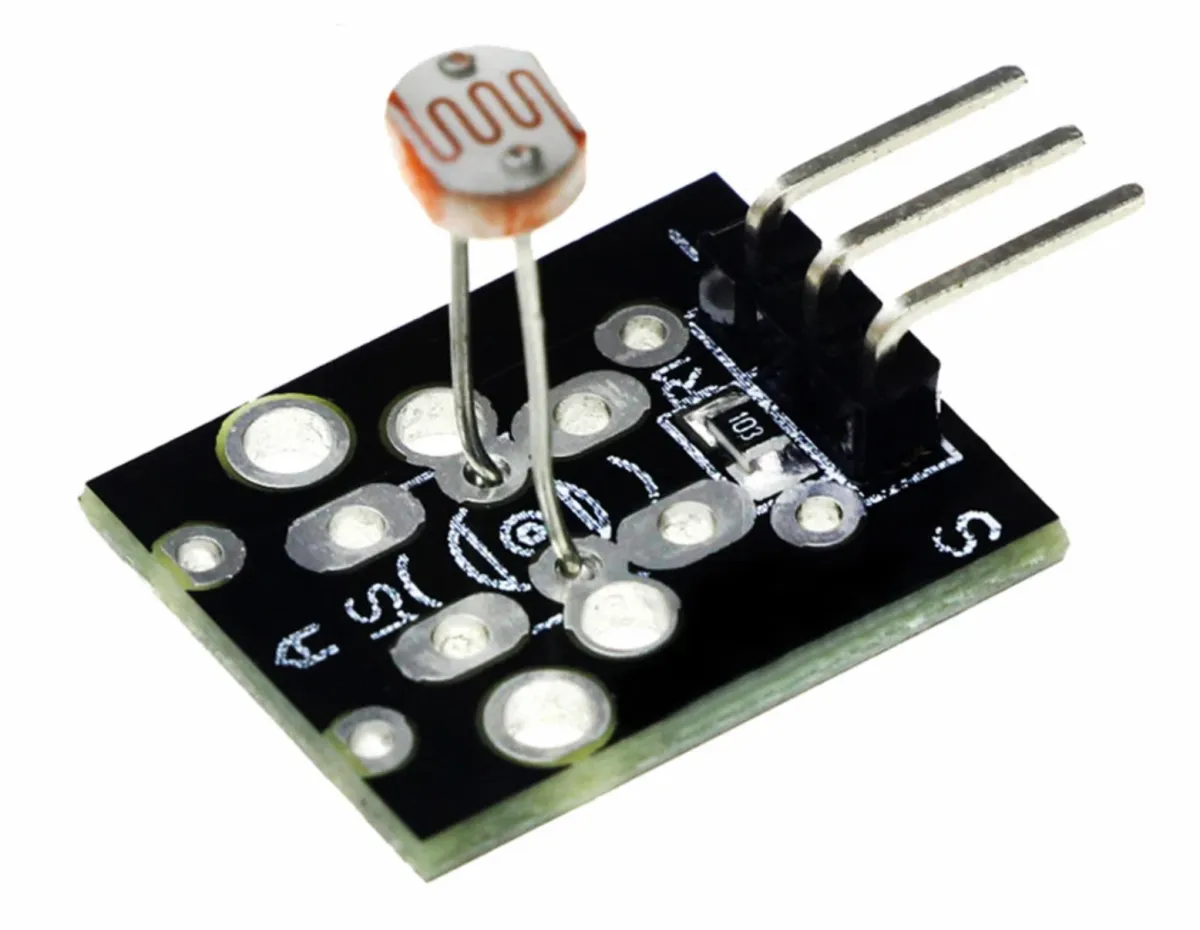
SKU: OT8342 Numero articolo: AB028 EAN: 8720828223451

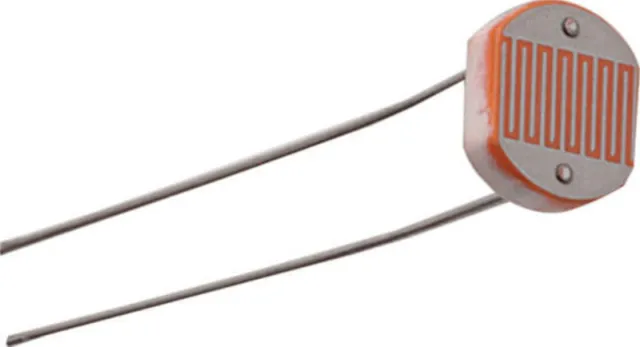
LDR è l'abbreviazione di Light Dependent Resistor. Un LDR è una fotoresistenza, cioè una resistenza che modifica il proprio valore in risposta ai cambiamenti del livello di luce a cui è esposta. Quando più luce colpisce l'LDR, la resistenza diminuisce, e quando c'è meno luce, la resistenza aumenta. Questa caratteristica rende l'LDR adatto ad applicazioni come circuiti fotosensibili e automazione.
Da utilizzare sia con Arduino che con ESP32, ESP8266, Rapberry Pi, Pi Pico e anche in circuiti senza microcontrollore.
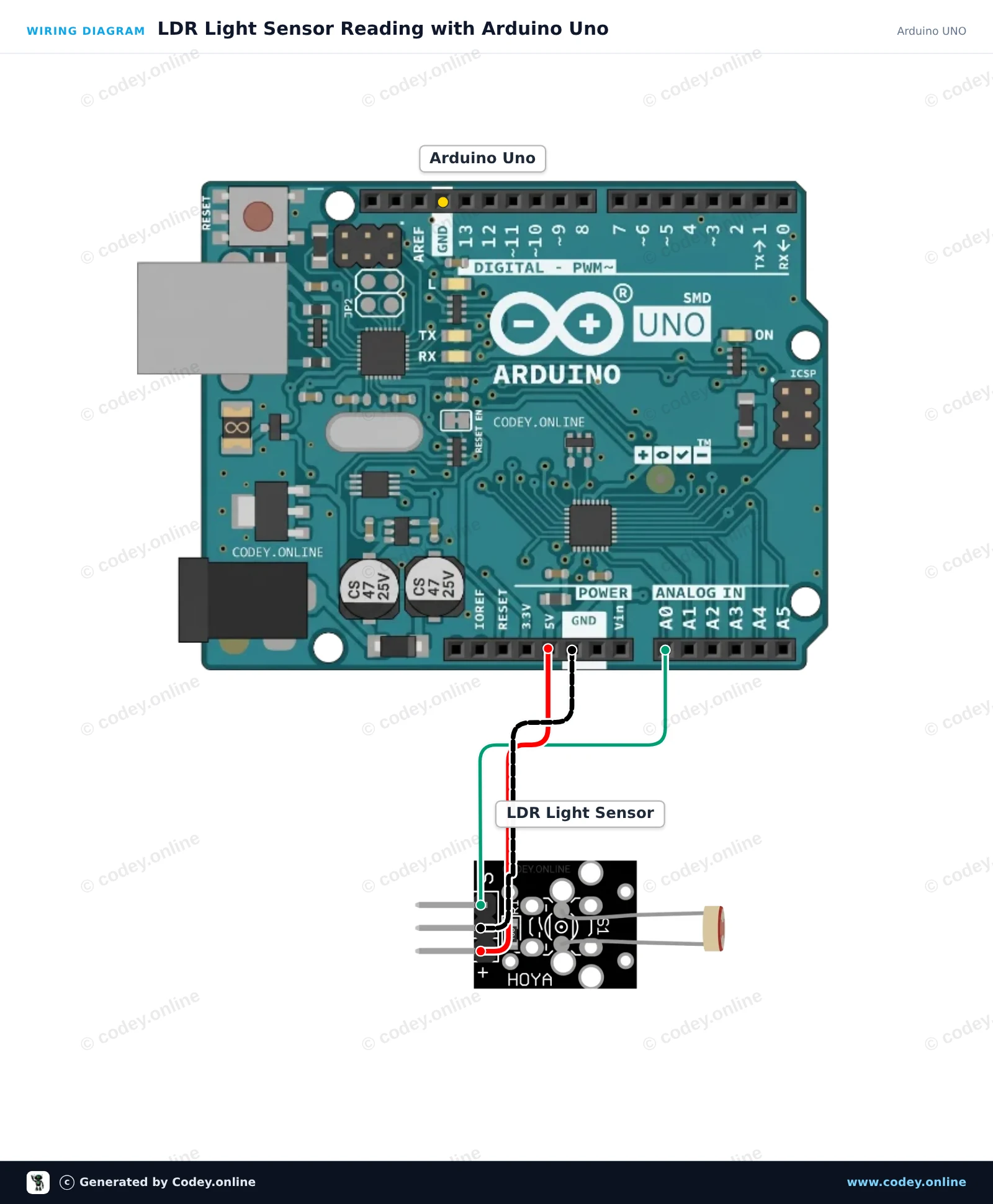
Ecco come collegare il Modulo sensore LDR fotosensibile a un Arduino UNO o ESP32, con uno sketch di esempio che puoi caricare subito.
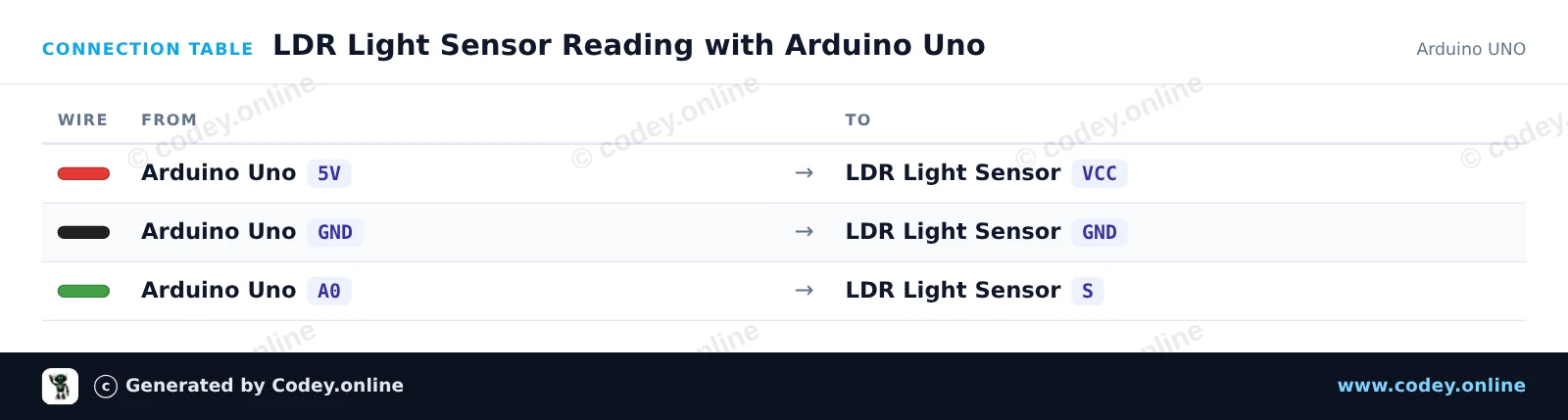
Questo progetto misura il livello di luce ambientale usando un modulo sensore di luce LDR collegato all’ingresso analogico A0 di Arduino Uno. Arduino legge la tensione analogica, mappa l’intensità luminosa e stampa il valore grezzo nel Serial Monitor. Coprendo il sensore, la lettura cambia in tempo reale.
/*
 * ==================================================================
 *  Generated by Codey.online  —  https://www.codey.online
 * ==================================================================
 *  Project   : LDR Light Sensor Reading with Arduino Uno
 *  Board     : Arduino UNO (arduino:avr:uno)
 *  Parts     : LDR Light Sensor Module
 *  Libraries : none (built-in)
 *
 *  Codey Online is an AI-powered browser IDE for Arduino and ESP32.
 *  Describe your project and Codey writes the code, draws the wiring
 *  diagram and uploads it to your board, straight from the browser.
 *  This code is free to use, modify and share, without warranty.
 * ==================================================================
 */

const int ldrPin = A0;
const int ledPin = 13;

void setup() {
  Serial.begin(115200);
  pinMode(ledPin, OUTPUT);
  Serial.println(F("LDR Light Sensor Initialized"));
}

void loop() {
  int rawValue = analogRead(ldrPin);
  float voltage = rawValue * (5.0 / 1023.0);

  Serial.print(F("Raw: "));
  Serial.print(rawValue);
  Serial.print(F(" | Voltage: "));
  Serial.print(voltage, 2);
  Serial.print(F(" V | Status: "));

  // Turn on built-in LED if light level drops below threshold
  if (rawValue < 400) {
    digitalWrite(ledPin, HIGH);
    Serial.println(F("Dark (LED ON)"));
  } else {
    digitalWrite(ledPin, LOW);
    Serial.println(F("Bright (LED OFF)"));
  }

  delay(300);
}Wiring diagram and example code generated by Codey.online — https://www.codey.online
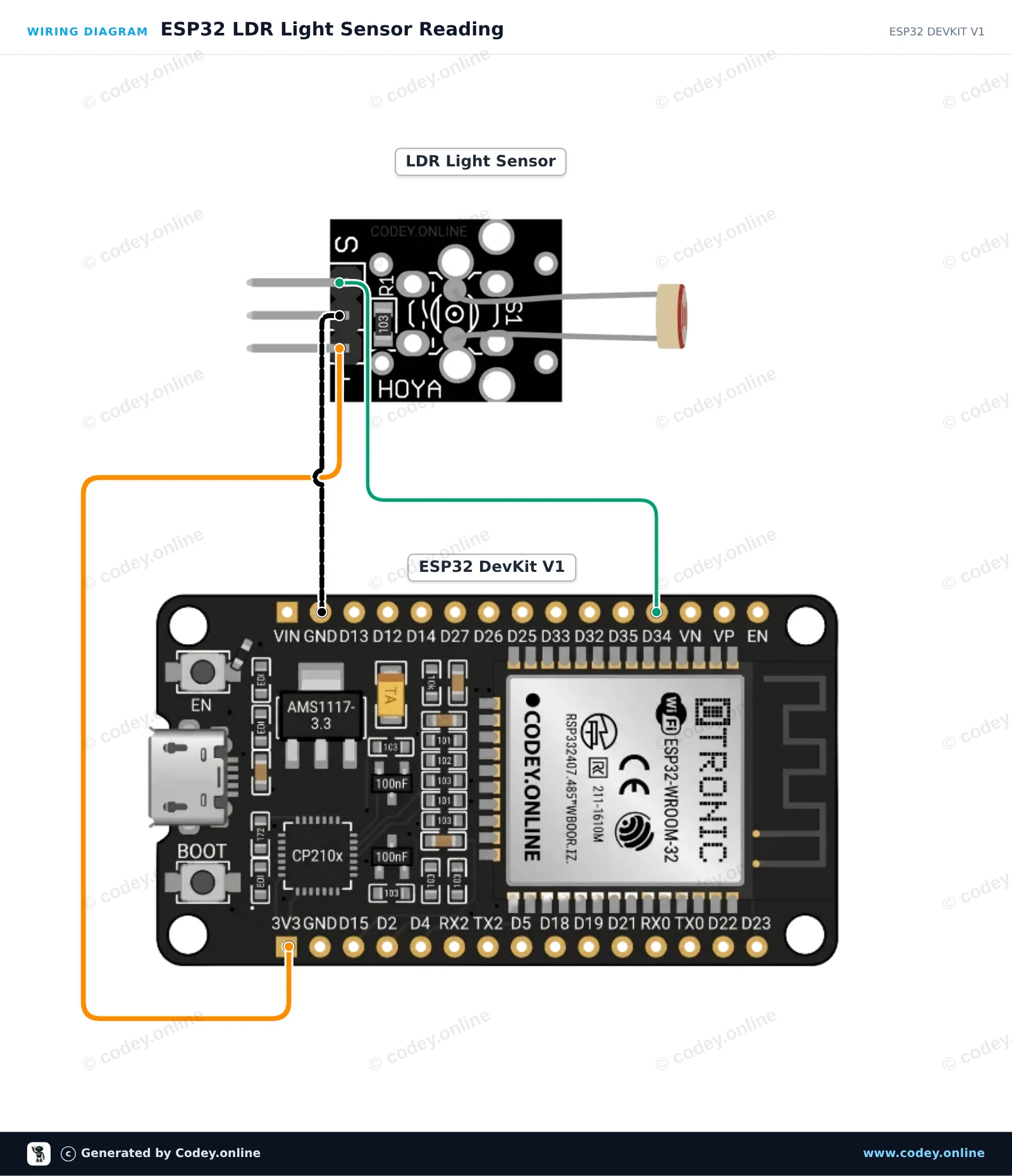
Questo progetto mostra come leggere i livelli di luce ambientale utilizzando un modulo sensore di luce LDR collegato all’ESP32. Il modulo emette una tensione analogica proporzionale all’intensità luminosa, letta tramite GPIO 34. Apri il Monitor Seriale a 115200 baud per visualizzare le letture della luce in tempo reale.
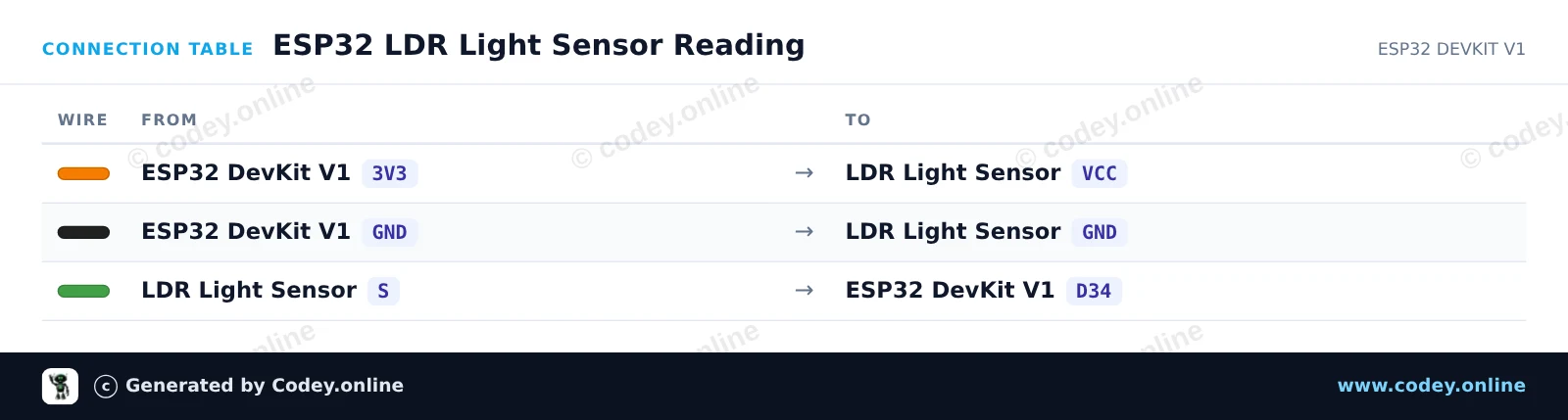
/*
 * ==================================================================
 *  Generated by Codey.online  —  https://www.codey.online
 * ==================================================================
 *  Project   : ESP32 LDR Light Sensor Reading
 *  Board     : ESP32 DEVKIT V1 (esp32:esp32:esp32doit-devkit-v1)
 *  Parts     : LDR Light Sensor Module
 *  Libraries : none (built-in)
 *
 *  Codey Online is an AI-powered browser IDE for Arduino and ESP32.
 *  Describe your project and Codey writes the code, draws the wiring
 *  diagram and uploads it to your board, straight from the browser.
 *  This code is free to use, modify and share, without warranty.
 * ==================================================================
 */

// LDR Light Sensor Demo for ESP32
const int LDR_PIN = 34;

void setup() {
  Serial.begin(115200);
  delay(1000);
  Serial.println("ESP32 LDR Light Sensor Demo");
}

void loop() {
  // Read the analog value (0 - 4095 on ESP32 12-bit ADC)
  int rawValue = analogRead(LDR_PIN);

  // Convert to approximate percentage
  float percentage = (rawValue / 4095.0) * 100.0;

  Serial.print("Raw ADC: ");
  Serial.print(rawValue);
  Serial.print(" | Light Level: ");
  Serial.print(percentage, 1);
  Serial.println("%");

  delay(500);
}Wiring diagram and example code generated by Codey.online — https://www.codey.online





 English
  Nederlands
  Frans
Frans  Deutsch
  Español
  Suomi
Suomi  Polski
  Dansk
Dansk  Ελληνικά
  Български
  Čeština
  Hrvatski
  Aileen