SKU: OT712-D65 Numero articolo: NB115 EAN: 8944452371856

ATTENZIONE versione 5V. Adatto per Arduino UNO, Arduino NANO, Arduino MEGA e altre schede Arduino o microcontrollori che funzionano a 5V.
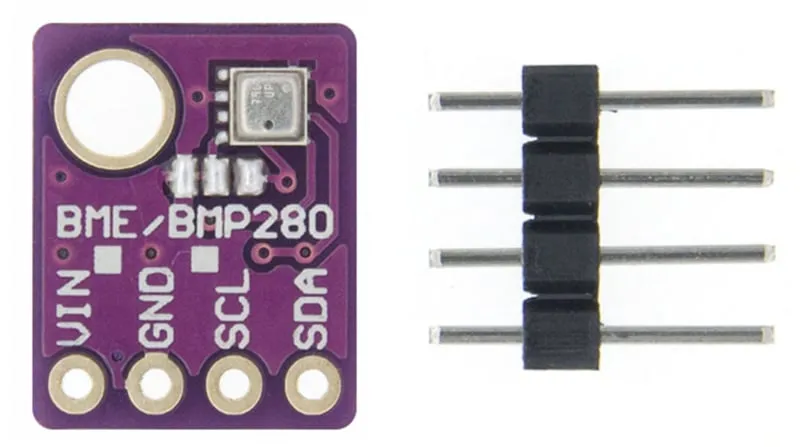
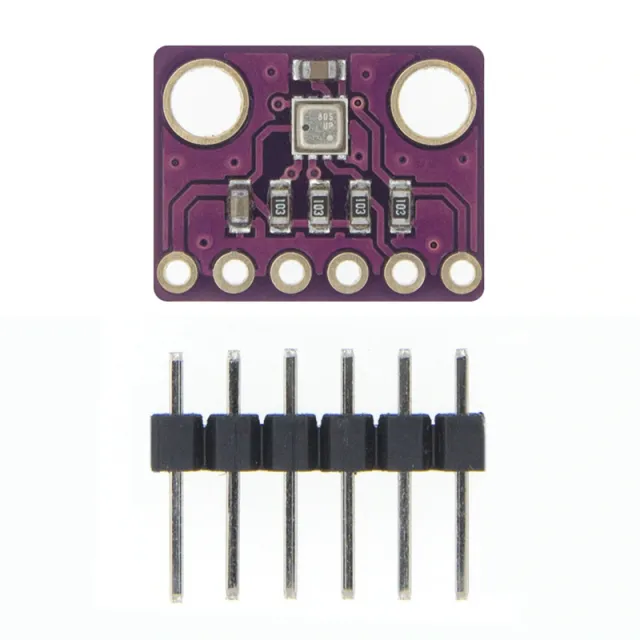
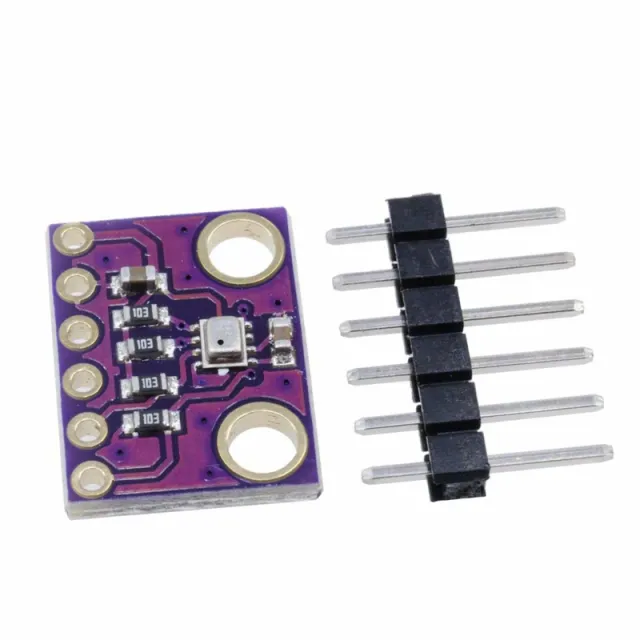
GY-BME280 è una breakout board con un sensore Bosch Sensortec ME280 di temperatura, umidità e pressione atmosferica.
- Resistenze di pull-up I2C
- Include header a 4 pin da 2.54mm
Caratteristiche BME280
- Marca sensore: Bosch
- Dimensioni sensore 2.5mm x 2.5mm x 0.93mm LGA con coperchio metallico
- Interfaccia digitale I2C (fino a 3.4 MHz) e SPI (a 3 e 4 fili, fino a 10 MHz)
- Tensione di alimentazione: 5V
- Consumo di corrente 1.8 uA @ 1Hz umidità e temperatura, 2.8 uA @ 1Hz pressione e temperatura. 3.6 uA @ 1Hz umidità, pressione e temperatura e 0.1 uA in modalità sleep
- Intervallo sensore temperatura -40 / +85 C,
- Intervallo umidità; 0 - 100% umidità rel.
- Intervallo pressione atmosferica: 300- 1100 hPa
- I2C
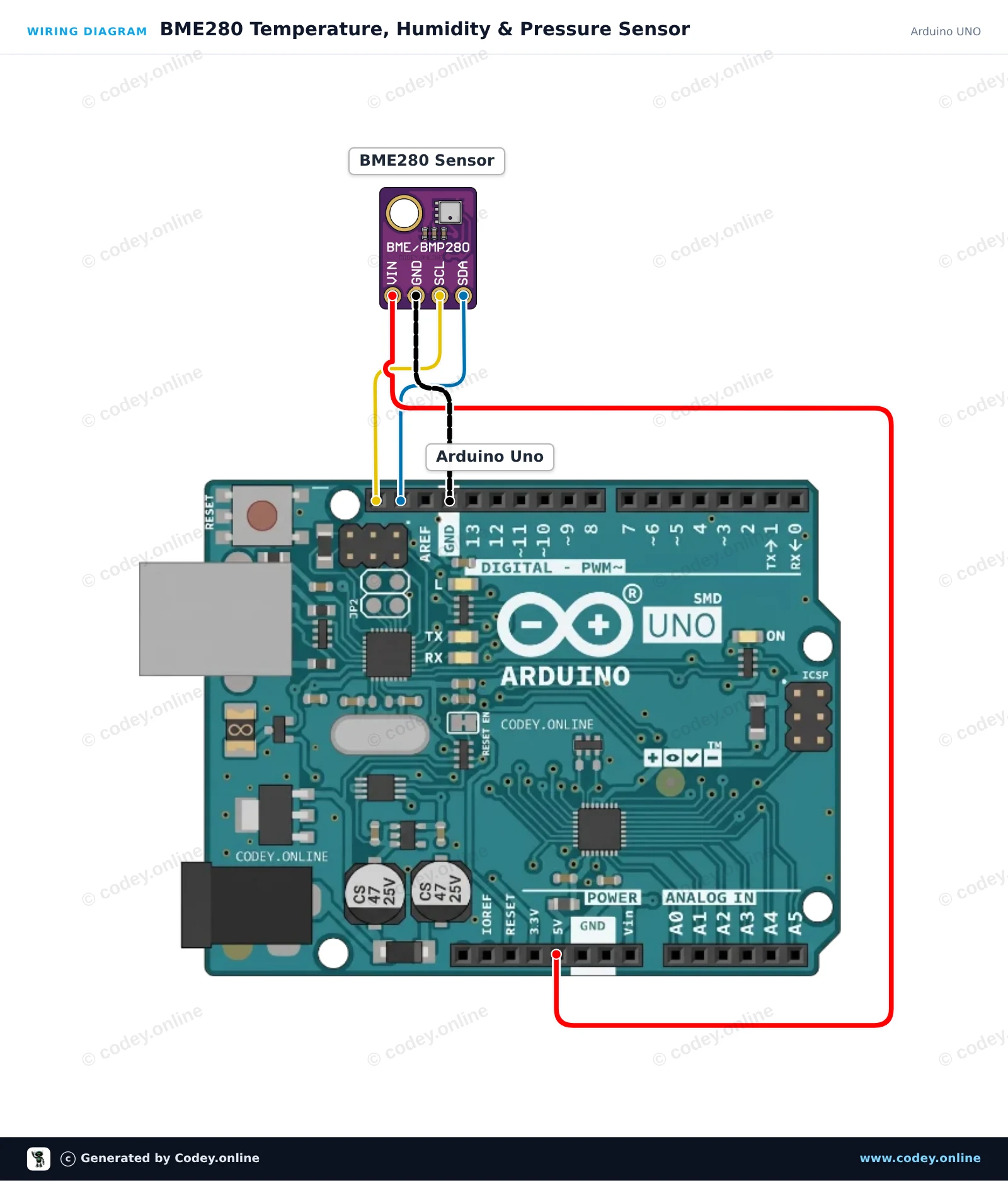
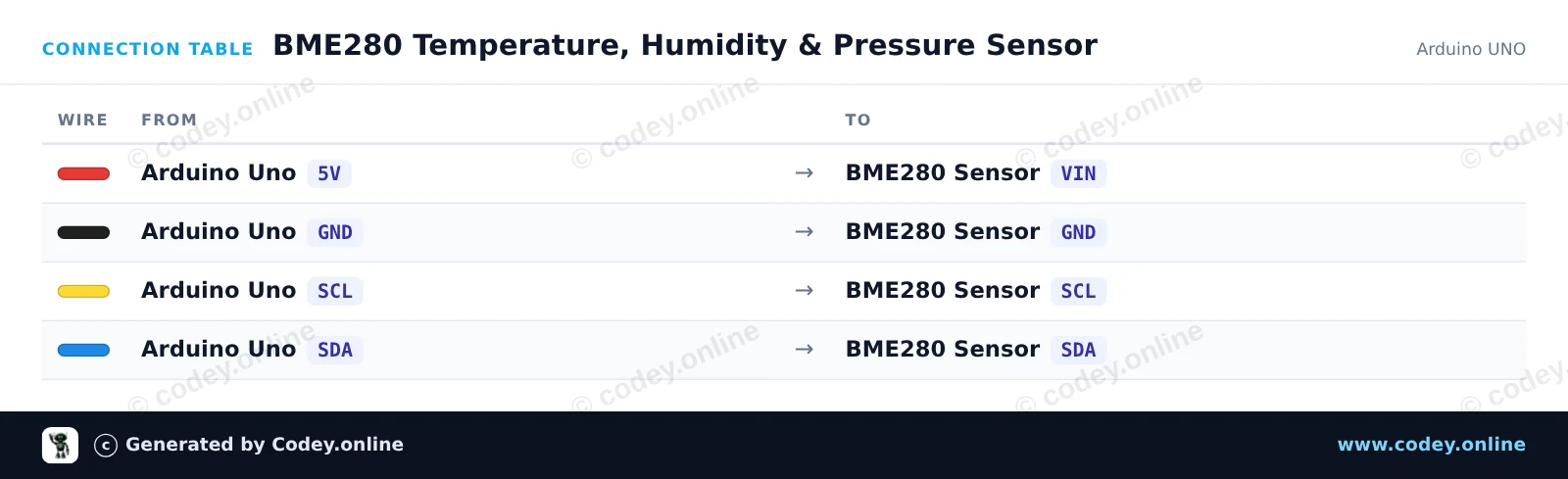
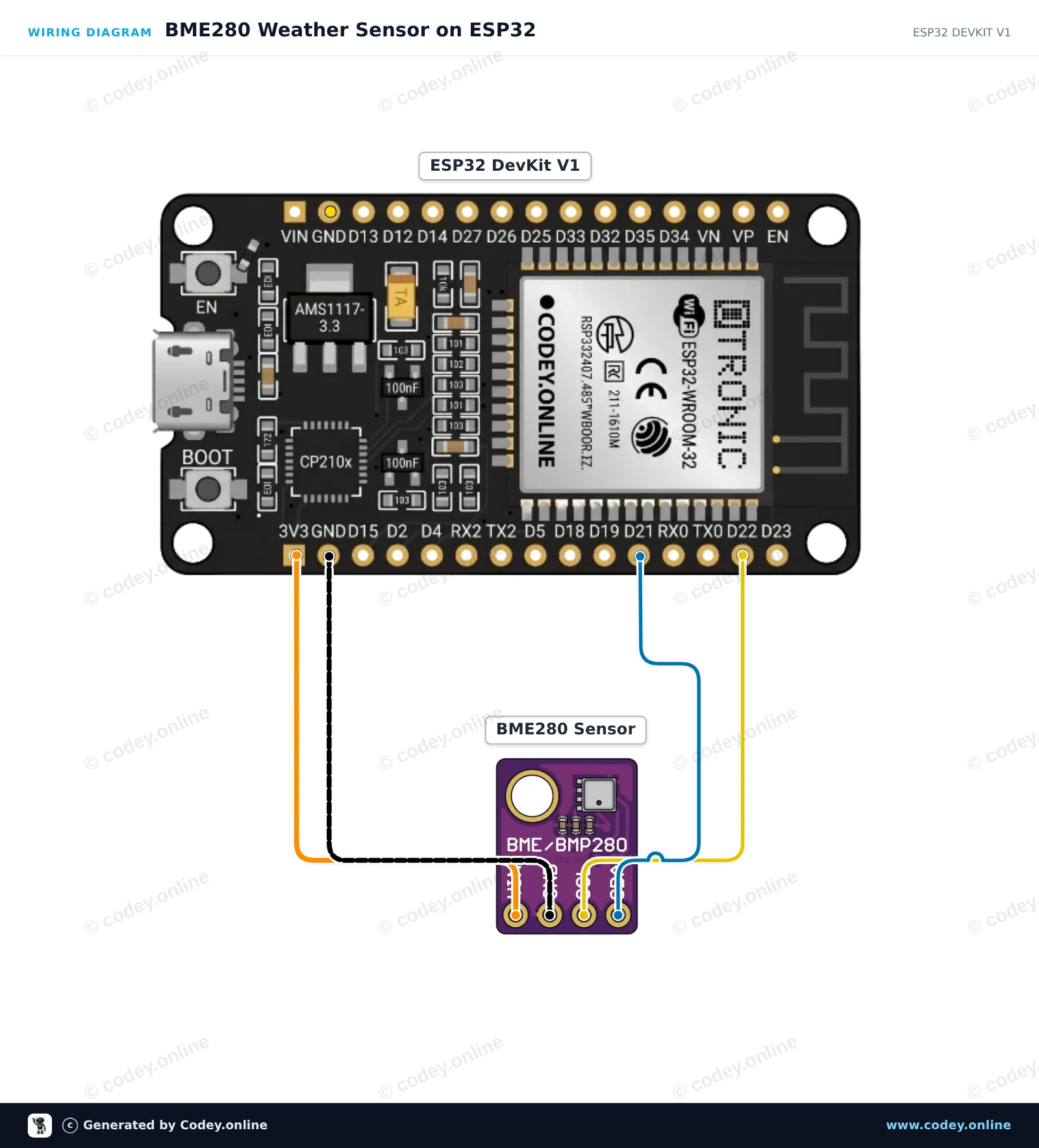
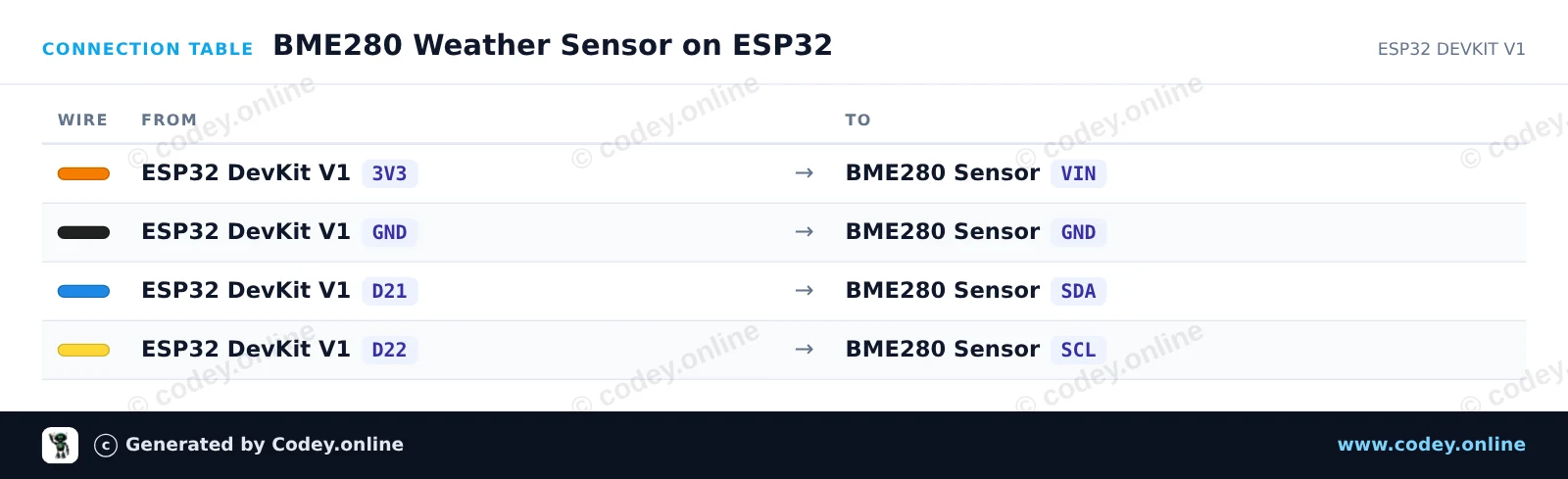
Ecco come collegare il Sensore 3-in-1 Temperatura Umidità e Pressione Atmosferica | 5V | I2C | Bosch BME280 a un Arduino UNO o ESP32, con uno sketch di esempio che puoi caricare subito.
Questo progetto legge la temperatura, l'umidità relativa e la pressione barometrica utilizzando il sensore BME280 tramite I2C. Le letture ambientali vengono mostrate nel Serial Monitor ogni due secondi. Basta collegare il sensore direttamente ai pin 5V, GND e I2C dell'Arduino Uno.
/*
 * ==================================================================
 *  Generated by Codey.online  —  https://www.codey.online
 * ==================================================================
 *  Project   : BME280 Temperature, Humidity & Pressure Sensor
 *  Board     : Arduino UNO (arduino:avr:uno)
 *  Parts     : Bosch BME280 5V 3-in-1 sensor Temperature Humidity and Air Pressure
 *  Libraries : Adafruit BME280 Library 2.3.0, Adafruit Unified Sensor 1.1.15
 *
 *  Codey Online is an AI-powered browser IDE for Arduino and ESP32.
 *  Describe your project and Codey writes the code, draws the wiring
 *  diagram and uploads it to your board, straight from the browser.
 *  This code is free to use, modify and share, without warranty.
 * ==================================================================
 */

#include <Wire.h>
#include <Adafruit_Sensor.h>
#include <Adafruit_BME280.h>

Adafruit_BME280 bme;

void setup() {
  Serial.begin(115200);
  while (!Serial) {
    delay(10);
  }

  Serial.println(F("--- BME280 Sensor Test ---"));

  // Try I2C address 0x76 first, fallback to 0x77 if needed
  if (!bme.begin(0x76) && !bme.begin(0x77)) {
    Serial.println(F("Could not find a valid BME280 sensor! Check wiring."));
    while (1) {
      delay(100);
    }
  }

  Serial.println(F("BME280 sensor initialized successfully."));
}

void loop() {
  float temperature = bme.readTemperature();
  float humidity = bme.readHumidity();
  float pressure = bme.readPressure() / 100.0F; // Convert Pa to hPa

  Serial.print(F("Temperature: "));
  Serial.print(temperature, 2);
  Serial.println(F(" °C"));

  Serial.print(F("Humidity:    "));
  Serial.print(humidity, 2);
  Serial.println(F(" %"));

  Serial.print(F("Pressure:    "));
  Serial.print(pressure, 2);
  Serial.println(F(" hPa"));

  Serial.println(F("---------------------------"));
  delay(2000);
}Librerie necessarie: Adafruit BME280 Library 2.3.0, Adafruit Unified Sensor 1.1.15
Wiring diagram and example code generated by Codey.online — https://www.codey.online
Reads ambient temperature, relative humidity, and barometric pressure from the Bosch BME280 sensor via I2C. The readings are output to the Serial Monitor every two seconds. Powered directly from the ESP32 3.3V pin to ensure safe I2C voltage levels.
/*
 * ==================================================================
 *  Generated by Codey.online  —  https://www.codey.online
 * ==================================================================
 *  Project   : BME280 Weather Sensor on ESP32
 *  Board     : ESP32 DEVKIT V1 (esp32:esp32:esp32doit-devkit-v1)
 *  Parts     : Bosch BME280 5V 3-in-1 sensor Temperature Humidity and Air Pressure
 *  Libraries : Adafruit BME280 Library 2.3.0, Adafruit Unified Sensor 1.1.15
 *
 *  Codey Online is an AI-powered browser IDE for Arduino and ESP32.
 *  Describe your project and Codey writes the code, draws the wiring
 *  diagram and uploads it to your board, straight from the browser.
 *  This code is free to use, modify and share, without warranty.
 * ==================================================================
 */

#include <Wire.h>
#include <Adafruit_Sensor.h>
#include <Adafruit_BME280.h>

Adafruit_BME280 bme;

void setup() {
  Serial.begin(115200);
  while (!Serial) delay(10);

  Serial.println("BME280 Sensor Test");

  // Default I2C address is 0x76 or 0x77
  if (!bme.begin(0x76) && !bme.begin(0x77)) {
    Serial.println("Could not find a valid BME280 sensor, check wiring!");
    while (1) delay(10);
  }

  Serial.println("BME280 sensor initialized successfully.");
}

void loop() {
  float temperature = bme.readTemperature();
  float humidity = bme.readHumidity();
  float pressure = bme.readPressure() / 100.0F; // hPa

  Serial.print("Temperature: ");
  Serial.print(temperature, 1);
  Serial.print(" °C | Humidity: ");
  Serial.print(humidity, 1);
  Serial.print(" % | Pressure: ");
  Serial.print(pressure, 1);
  Serial.println(" hPa");

  delay(2000);
}Librerie necessarie: Adafruit BME280 Library 2.3.0, Adafruit Unified Sensor 1.1.15
Wiring diagram and example code generated by Codey.online — https://www.codey.online





 English
  Nederlands
  Frans
Frans  Deutsch
  Español
  Suomi
Suomi  Polski
  Dansk
Dansk  Ελληνικά
  Български
  Čeština
  Hrvatski
  Aileen